Improve the Accessibility and SEO of Your PDF
Most browsers include built-in PDF viewers, but assistive technologies such as JAWS and NVDA often cannot access full PDF content when files are embedded directly.
FlowPaper improves accessibility by converting PDF content into HTML5 structures that are easier for screen readers and search engines to process.
Video tutorial
Why standard embedded PDFs can be limited
Embedded PDFs in browsers often run inside restricted objects that have limited interaction with the operating system.
Because of these restrictions, screen readers may only access the first visible text blocks instead of the full document.
How FlowPaper exposes accessible content
FlowPaper converts publication text into real HTML elements so assistive technologies can read it more reliably.
You can inspect a published Elements page and see semantic tags for headings and structured text output.
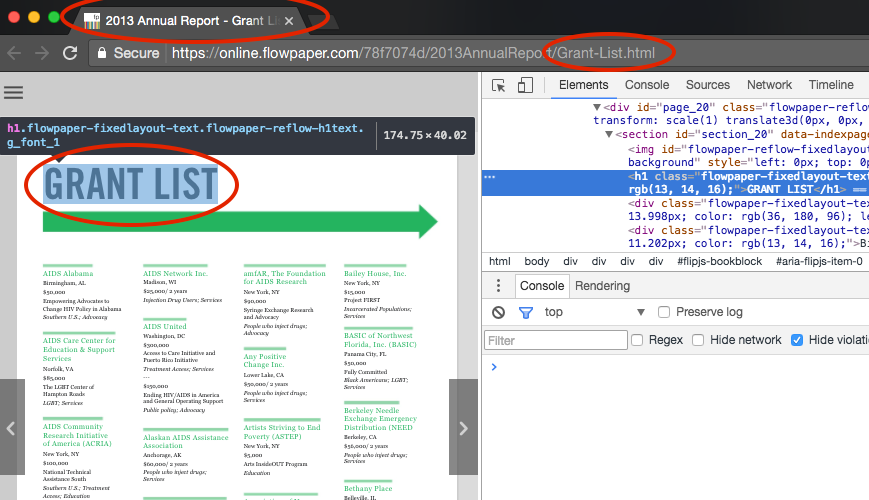 Headings are mapped to HTML heading tags, and page titles are updated to match the active content.
Enable improved accessibility mode
FlowPaper includes baseline accessibility by default, but some PDFs contain embedded non-Unicode fonts that reduce text readability for assistive tools.
In those cases, improved accessibility mode adds human-readable text output alongside rendered content for better screen reader support.
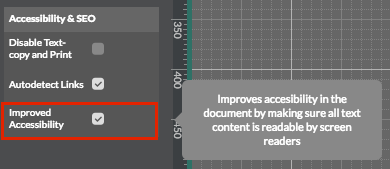 Enable improved accessibility mode by selecting the checkbox in the left-side panel of the desktop publisher.
Publish and test accessibility output
After finishing your publication, click Publish, then View in Browser.
Use your preferred screen reader, or test with FlowPaper Elements text-to-speech controls, to verify page-by-page readability.