Start Your Publication at a Specific Page
There are several ways to open an online publication on a specific page. You can configure this in FlowPaper Desktop Publisher, in JavaScript, or directly through the URL.
Video tutorial
Set start page in Desktop Publisher
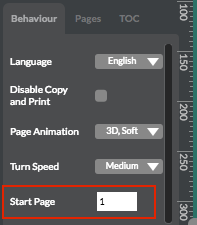
To preset an opening page, change Viewer Behavior settings to your desired start page in the left-side panel of Desktop Publisher.
Set StartAtPage in JavaScript
If you inspect the generated viewer code after publishing, you can set the opening page using the StartAtPage config value.
$('#documentViewer').FlowPaperViewer(
  ...
  { config: { StartAtPage: 5
  ...
  }}
);
Start on a page through URL
You can also control start page via URL by adding a #page parameter.
Example:
- http://devaldi.com/zine/NZ_Tourism_2007.php?ro=html5,flash#page=5