Improve the Search Ranking of Your PDFs
It is possible to improve the exposure and search ranking of your published PDF documents in organic search. This guide explains how FlowPaper can make your content more discoverable and why that matters.
Introduction
Traditionally, when Google indexes PDF documents, it treats each file largely as a single unit, which makes it difficult to understand why readers landed on a document or which parts of it matched their searches. By converting PDF content into real HTML5 elements, FlowPaper Desktop Publisher creates a more search-engine-friendly version of your publication.
As a result, Google can more easily identify headings and content buried deep inside the document. It also becomes easier to collect data about how readers arrive at specific parts of your publication.
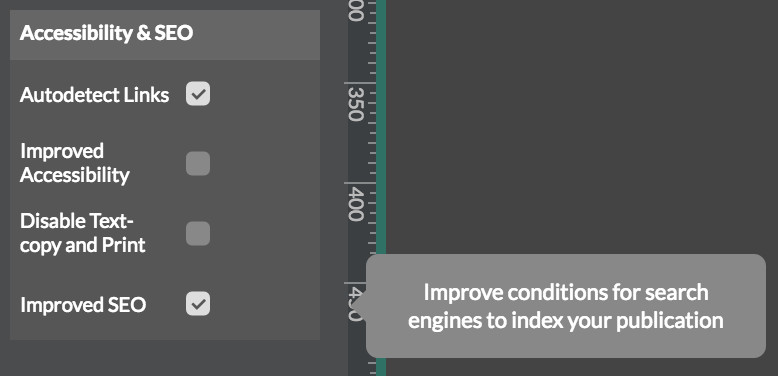
Locate the settings
To access this feature, open FlowPaper Desktop Publisher and go to the settings in the Behaviour tab on the left-hand side of the application.
Understand how ranking improves
Zine and Elements behave differently in how they expose PDF content, and that difference matters for SEO.
FlowPaper Zine exposes each text fragment in a PDF document on a page-by-page basis, similar to a regular PDF, but with faster loading because the content is split into smaller segments.
FlowPaper Elements, on the other hand, detects and converts the text in a PDF while also adding metadata for headers, pages, and sections. PDFs do not normally contain semantic metadata, so a main title in a PDF is just larger text on a page. In FlowPaper Elements, that same title becomes a real HTML heading, typically an H1.
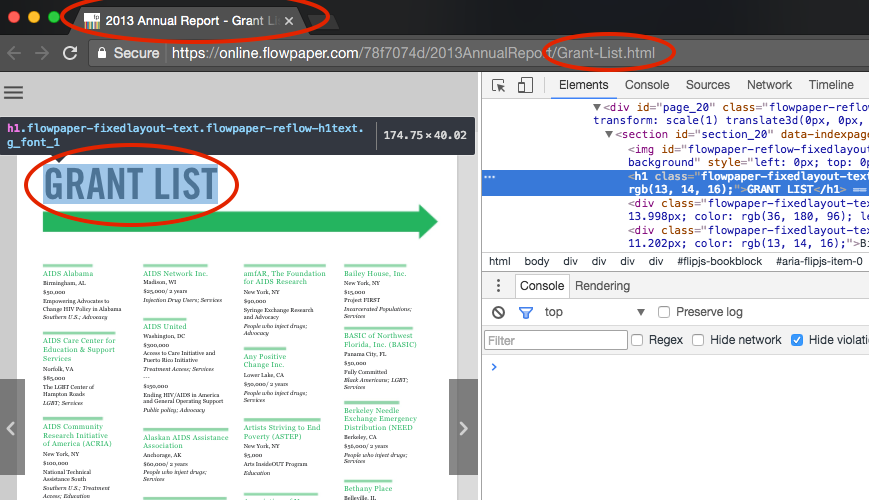
FlowPaper also defines each subsection of a publication with its own title using proper HTML5 tags. It exports each section into its own HTML page and sets the page title to match the section content. Based on our studies, this improved structure and metadata can increase search visibility.
Reading more
You can read a study and a more detailed explanation of how publishing format affects search ranking in this blog post: Improve search ranking for PDF content.